Covers Fri 2 – Thu 8 Oct 2026 (weeks 40–41): AI Foundry, aifoundry2's ET-SoC-1 card at Studio 45. Written Thu 8 Oct 2026 (week 41), about 16:00 PDT, on the Intel, from #community-lab (2 and 8 Oct), the readings Roman Shaposhnik's agent posted there at 15:08 and 15:13, your lab photos of 2 and 6 Oct, the lab repo, and the Amazon and Central Computers pages as read at 15:40–15:50.
The fan behind aifoundry2's card is failing, and a $30 fan should bring the card back near aifoundry3's 56 °C at idle. At 15:13 today Roman's agent found every fan header on aifoundry2 already running at 100%. The one fan Linux can see kept stalling and restarting anyway: 1,638 → 515 → 1,167 → 586 RPM, 2 s apart. aifoundry1's card fan failed the same way on 2 Oct, and Roman swapped it on the spot. What you need is a 120 mm × 25 mm, 12 V, 4-pin PWM case fan with a long-life bearing. Buy two, one to fit and one for the shelf: Noctua NF-F12 industrialPPC-3000 PWM on Amazon, $29.95 each.
Update, Thu 8 Oct, 16:12: ordered. You ordered one NF-F12 industrialPPC-3000 PWM on Amazon ($30.90 in all). It arrives Mon 12 Oct (week 42), after Friday's visit. So on Friday, fit a lab spare (Roman says there are plenty) or one from Central Computers, and swap the Noctua in on the next visit.
What to buy
| Fan | Price | Buy |
|---|---|---|
| Noctua NF-F12 industrialPPC-3000 PWM: my pick, the most air, built for 24/7; loud | $29.95 | Amazon, in stock · Central Computers SF lists 8 |
| Noctua NF-A12x25 PWM: the quiet one | $34.95 | Amazon, in stock · Central Computers SF lists 78 |
| ARCTIC P12 Max: the cheap one | $9.99–12.99 | Amazon, but no offer from Amazon itself at 15:40 · Central Computers $12.99 |
| Fan | Speed | Airflow | Static pressure | Noise, full speed | Bearing and warranty |
|---|---|---|---|---|---|
| iPPC-3000 | 3,000 RPM | 110 CFM | 7.63 mm H₂O | 43.5 dB(A) | SSO2, over 150,000 h, IP52, 6 years |
| NF-A12x25 | 2,000 RPM | 60 CFM | 2.34 mm H₂O | 22.6 dB(A) | SSO2, over 150,000 h, 6 years |
| P12 Max | 3,300 RPM | 81 CFM | 4.35 mm H₂O | 0.6 sone | fluid dynamic, 6 years |
- Why the iPPC-3000: it moves the most air of the three, and its bearing is built for a fan that the BIOS runs at full speed day and night. That bearing is the part that wears out. ARCTIC's own listing says the P12 Max's bearings "tend to wear out". The iPPC's cost is noise. If the lab minds, turn it down with the header's curve in the BIOS, or fit the NF-A12x25 instead.
- Any standard 120 × 25 mm fan fits. The old fan sits in a clip on the frame (photo below), and all three have the standard 105 mm hole spacing and a 4-pin plug.
- By Friday noon: Amazon's free delivery showed Tue 13 Oct (read while signed out; Prime may be sooner). Central Computers, 837 Howard St, opens at 9:00 on Friday (415-495-5888). Its pages list both Noctuas at the SF store, but they also warn that the counts may be off, so call first. Roman says there are "a lot of "spare parts" in the lab", so a lab spare can go in first if the new fan isn't there yet.
The fan, and why it's this one
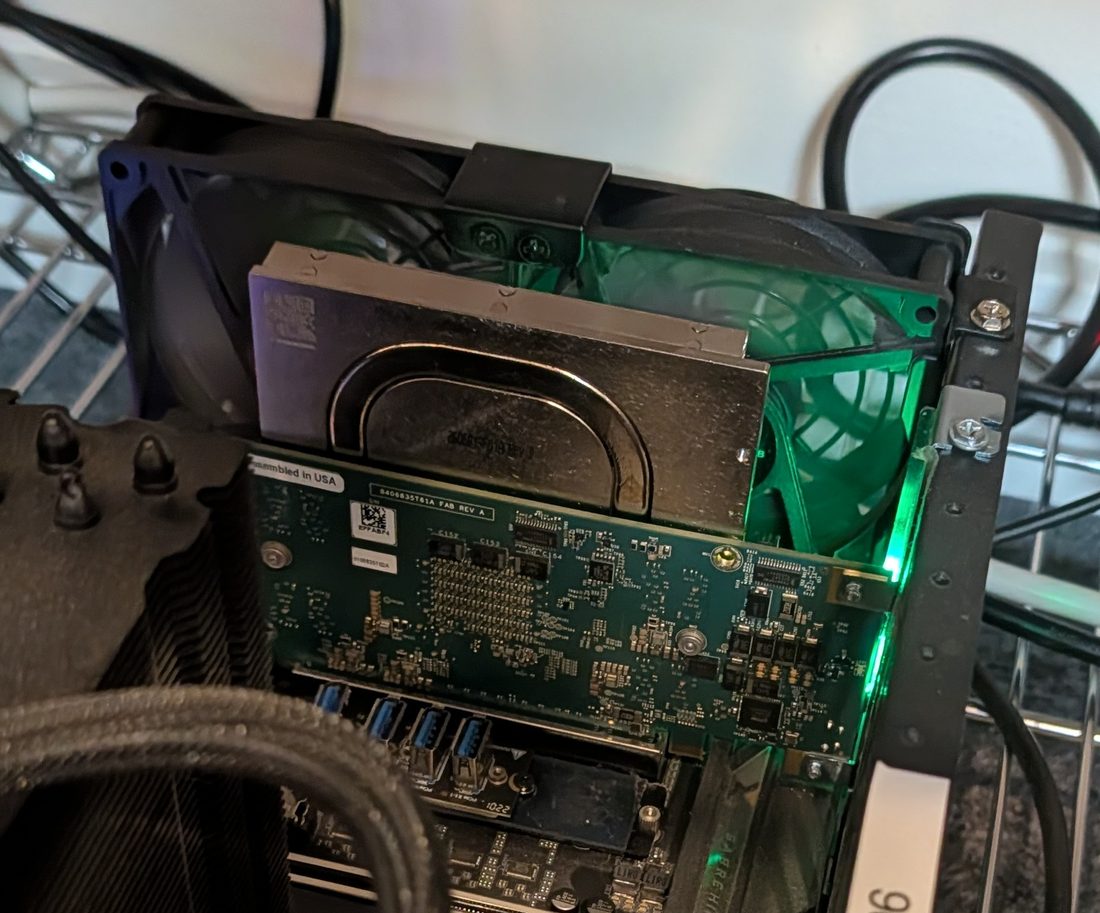
- The card has no fan of its own. Its cooler is passive: a flat plate with a U-shaped heat pipe. The hosts are open frames on a wire shelf with no case fans, so all the card's airflow comes from one 120 mm fan clipped behind it.
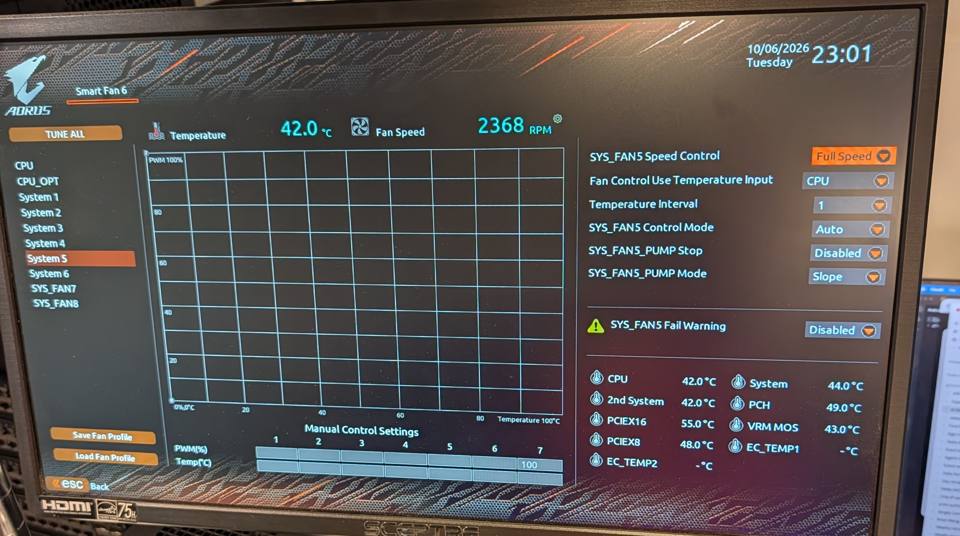
- That fan plugs into the motherboard, most likely SYS_FAN5. In the BIOS on 6 Oct, System 5 read 2,368 RPM at Full Speed, while CPU_FAN read 1,383 RPM on its curve. Before it began to stall, today's fan1 on Linux read 2,311 RPM, close to System 5's speed.
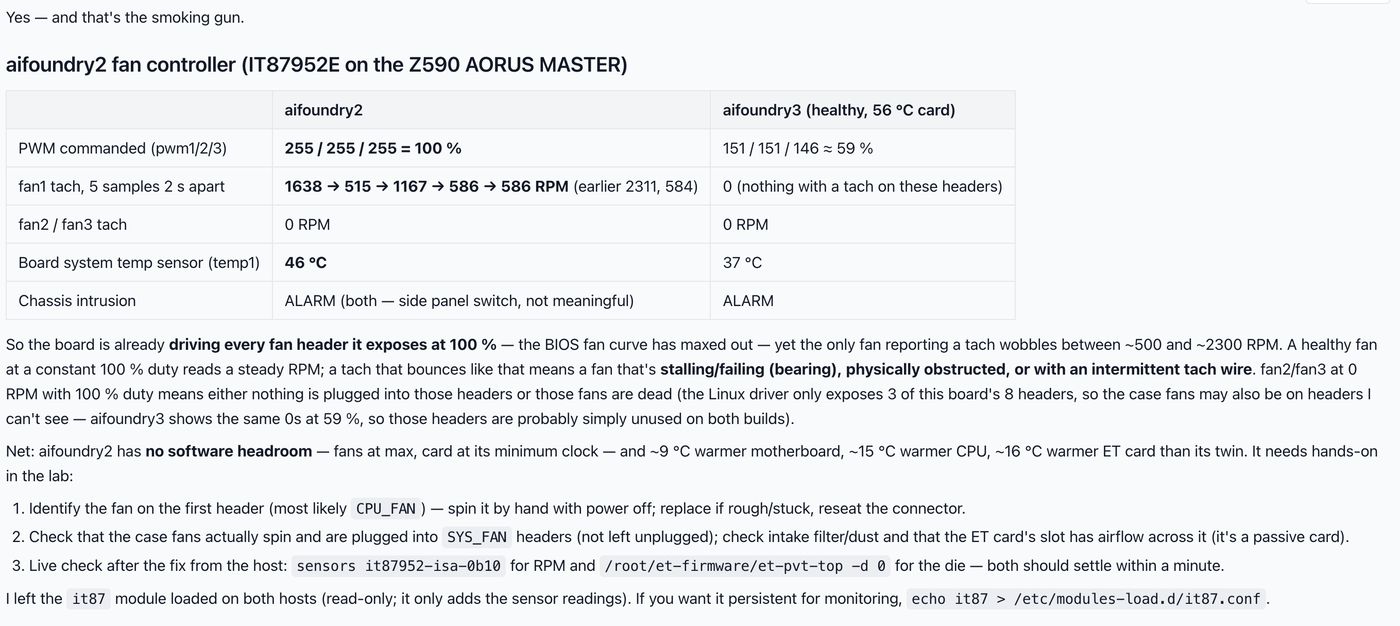
- fan1 is probably not the CPU fan, as Roman's agent guessed. Linux sees only the board's second fan chip, the IT87952E. On a sister board, the X570 AORUS MASTER, CPU_FAN sits on the main chip, and the second chip carries the remaining system and pump headers (its sensor map). aifoundry3 has the same board, and all three of its channels read 0 RPM. On an open frame with no case fans, a fan on a system header is the card's fan. Follow its cable on Friday to confirm.
What happened, in order
- Fri 2 Oct, about 12:55: aifoundry1's card 0 fan was stuck. You posted that it was visibly stuck and that Roman replaced it. The card dropped from 65 °C at idle (with a 123 °C hot spot) to 49 °C (14-card-behaviour.md).
- Tue 6 Oct, 16:00: every header set to Full Speed in the BIOS. The idle card held 64 °C (the 6 Oct page).
- Wed 7 Oct: the cooling at the card got worse in one step at 03:55, and again at about 14:25, while the card's power stayed on its leakage curve. It ran away at 16:46 (138 °C, 133 W). A fan that slows and stalls fits that, and nothing else changed. A lab-wide power cut at 18:16 then left aifoundry2 off.
- Thu 8 Oct, 14:47: Roman brought aifoundry2 back (it had been stuck at the BIOS splash screen) and began experiments on the card.
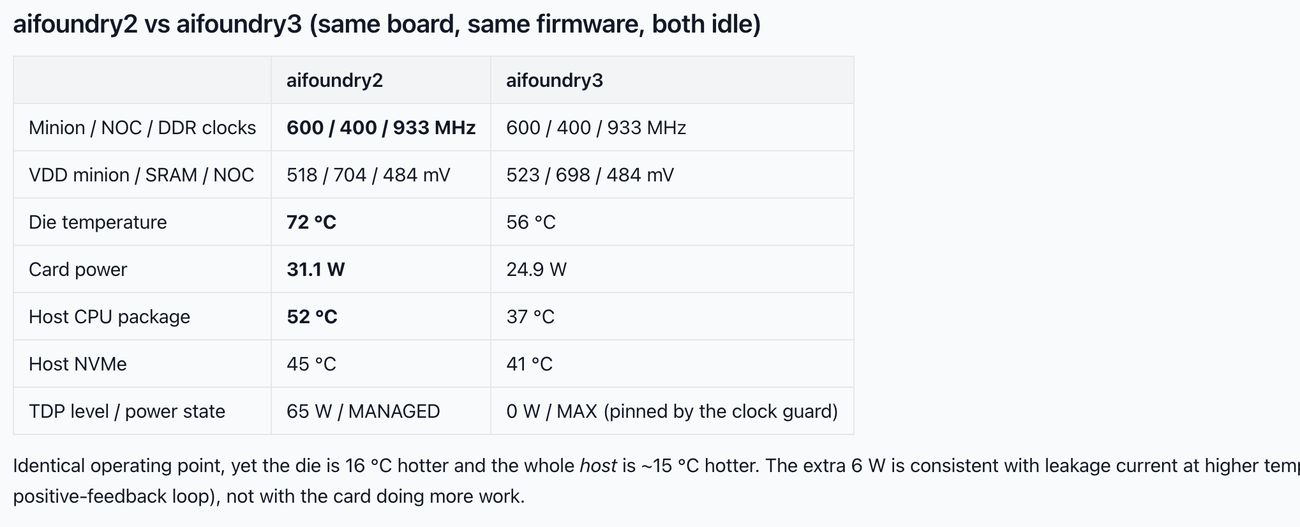
- 15:08, his agent's comparison: the same clocks and voltages on both hosts, but aifoundry2's die read 72 °C at 31.1 W, against 56 °C at 24.9 W on aifoundry3, and its CPU 52 against 37 °C.
- 15:13, the fan controller: all three PWM channels at 100%, yet fan1 read 1,638 → 515 → 1,167 → 586 → 586 RPM, and fan2 and fan3 read 0. His agent called it a fan "stalling/failing (bearing), physically obstructed, or with an intermittent tach wire".
- 15:15–15:25: you asked whether there are spare fans. Roman said to start with the lab's spare parts, and you signed up to look on Friday.
Friday at Studio 45, in order
- Bring a fan: the Noctua you ordered arrives Monday. For Friday, take a lab spare (ask Roman), or pick one up on the way at Central Computers, 837 Howard St (opens 9:00).
- Before switching off: watch the fan behind aifoundry2's card for 30 seconds and compare it with aifoundry3's. A fan that stalls and restarts, wobbles or ticks is the bad one. As root,
sensors it87952-isa-0b10shows fan1 live (Roman's agent loaded theit87module today). - Check that nobody holds the card (
et-who, and claims in #community-lab), thensudo poweroffand switch the power supply off. - Spin the fan by hand. If it feels rough or stiff, or stops quickly, replace it. Follow its cable to the header (expected: SYS_FAN5). Check that the clip holds the fan square behind the card and that no cable touches the blades.
- Fit the new fan in the same clip, blowing the same way as the old one (the arrows are on the side of the frame). Plug it into the same header.
- In the BIOS (Del, then F6 for Smart Fan 6), check that the header is still on Full Speed and that its speed holds steady: about 3,000 RPM for the iPPC, 2,000 for the NF-A12x25. While you're in there, do the open item from 7 Oct: Settings → Platform Power → AC BACK = Always On (power management on aifoundry1–3).
- Boot. If the card isn't on the bus, do the cold reset. At idle it should settle near aifoundry3's 56 °C within the hour. Above 85 °C, switch the card off.
- Eric Frank's blower test: run it on the new fan, changing the airflow with the header's curve in the BIOS. A fan that stalls at random gives no clean test.
- Leave the spare at the rack, labelled for the ET hosts, and photograph the old fan's label so the lab knows the model.
Until Friday
aifoundry2 is running on the same fan, at 72 °C idle at 15:08. On 7 Oct the card crept for about 12 hours before it ran away. Above about 85 °C at idle, or 40 W, it is near its tipping point (the 6 Oct page). The dashboard can't warn you yet: its collector runs on aifoundry2, and at 14:48 its data was 21 hours old. Another session is fixing that.
So it doesn't happen again (lab-door work)
- Log the card fan's speed. fan1 is readable from Linux since today. To make that survive a reboot, add
it87to/etc/modules-load.d/it87.conf, then have the live collector record fan1 and raise an alarm when it drops below about 1,500 RPM at 100% duty. The 6 and 7 Oct pages say nobody can see the fans from Linux, and that is no longer true. - BIOS: set SYS_FAN5 Fail Warning to Enabled (it was Disabled on 6 Oct).
- Keep a spare 120 mm fan at the rack. These fans wear out with age, and two have failed within a week (2 and 7 Oct).
- The firmware gap stays open. Nothing on the card stops an idle runaway (CF1 on Requests for Roman), so the fan is all that stands between an idle card and a runaway.
What isn't known
- Which frame is aifoundry2. The machines carry Esperanto-era labels (
mv-…pcie…), not their aifoundry names. Both single-card frames have the same fan behind the card. - The old fan's make and model. On one frame it is a 120 mm fan with green LEDs. Read its label on Friday.
- That fan1 is SYS_FAN5. This rests on its speed, a sister board's sensor map and aifoundry3's zero readings. Nobody has traced the cable.
- A live reading from this session. ssh from the Intel stopped at Tailscale's browser check, and the request to aifoundry2's own Claude wasn't approved.
Total life satisfaction
A $30 part, picked up on the way to Studio 45, removes the likeliest cause of Wednesday's runaway. That frees Friday for the experiments with Eric Frank and Roman rather than another round of firefighting.
Sources
#community-labin the AIFoundry.org Discord, read through chrome-debug: Fri 2 Oct 12:42–13:08 (the stuck fan, with your photo), and Thu 8 Oct 14:47–15:25 (Roman's two tables, the spare parts). Saved in~/git0/aifoundry/work/fan-research/discord/.- The 6 Oct fan-fix page, with its BIOS photos and the 7 Oct runaway analysis; 14-card-behaviour.md in the lab repo.
- Your photos of Fri 2 Oct, 16:39 (location data stripped here).
- The ET-SoC-1 PCIe dev card V3 notes in aifoundry-org/et-boards (
et-soc1-pcie/dev-card-v3.pdf): the card itself has a "12V Fan" output on its power tree. aifoundry2's card fan runs from the motherboard instead. - Prices and stock, read Thu 8 Oct, 15:40–15:50 PDT: Amazon (iPPC-3000, NF-A12x25, P12 Max) and Central Computers (iPPC-3000, NF-A12x25, P12 Max, the SF store). Specs from the same listings, cross-checked against retailers' spec tables.
- Linux's
it87driver: IT87952E support since kernel 6.3 (Phoronix), up to three fans (kernel docs).